

Logitech MX Master 3S Wireless & BT Rechargeable Mouse
Specifications
- Sensor Technology: Darkfield high precision
- Nominal value: 1000 DPI
- DPI (Minimal and maximal value): 200-8000 DPI (can be set in increments of 50 DPI)
- Number of Buttons: 7 buttons
- Scroll Wheel: Yes, with smart-shift
- Thumb wheel: Yes
- Gesture button: Yes
- Customization app: Supported by Logi Options+ on Windows and macOS
- Battery type: Rechargeable Li-Po (500 mAh) battery
- Battery life: Get three hours of use from a one-minute quick charge
- Wireless technology: Bluetooth Low Energy Technology
- Wireless range: 32.8 ft (10 m)
- Dimensions: H4.92 in (124.9 mm)* W3.32 in (84.3 mm), D2.01 in (51 mm)
- Weight: 4.97 oz (141 g)
KSh 17,500.00 KSh 19,000.00
Overview
The Logitech MX Master 3S is a premium right-handed productivity mouse designed for professionals and power users. It supports wireless connection via Bluetooth and 2.4 GHz (with a dongle), is rechargeable via USB-C, and offers advanced features such as high-precision tracking, multi-device support, and a versatile scroll wheel. The “Graphite” color variant adds a dark-toned aesthetic ideal for modern workspaces and setups.
Key Benefits and Features
Ergonomic & Premium Build
-
The MX Master 3S features a sculpted shape with thumb rest and textured sides for a comfortable fit during long hours of use.
-
High-quality materials—including a matte finish and metal scroll wheel give it a refined feel befitting its price point.
-
Designed only for right-handed use (not ambidextrous).
Advanced Tracking & Sensor Technology
-
Utilizes Logitech’s Darkfield high-precision sensor, enabling use even on glass surfaces (depending on condition).
-
Maximum sensitivity of 8,000 DPI, a major upgrade over previous generations—useful for high-resolution displays or fine cursor control.
MagSpeed Scroll Wheel & Additional Controls
-
The metal MagSpeed scroll wheel smoothly toggles between click-to-click (ratchet) and ultra-fast free-spin modes. It can scroll up to 1,000 lines per minute in certain setups.
-
Includes a secondary thumb wheel and multiple programmable buttons (thumb buttons, gesture button) that can be customised via the Logitech Options+ software.
-
Excellent for workflows in video editing, large spreadsheets, or multi-tasking across applications.
Multi-Device & Connectivity Flexibility
-
Connects to multiple devices (up to three) via Bluetooth or the included 2.4 GHz “Unifying” dongle, and you can switch between them easily.
-
Rechargeable via USB-C; you can continue using it while charging. Battery life is very good (measured up to several weeks in typical use) though exact lifespan depends on workload.
Graphite Colour Variant
-
The Graphite colour gives a professional, sleek appearance—suiting furnished work-stations, home offices or shared desk setups.
-
Maintains all the same internal specs and features as other colour options (such as Black or Pale Gray).
Why It Stands Out for Productivity
-
The combination of premium materials, ergonomic shape, and robust features positions the MX Master 3S as a top choice for people who spend many hours at a computer (e.g., developers, designers, creators).
-
The ability to map application-specific shortcuts and the presence of the dual scroll wheels mean you can tailor the mouse to “work your way”.
-
Thanks to Bluetooth + dongle + multi-device switching, you can seamlessly move between a laptop, desktop, or tablet with minimal disruption.
Considerations Before You Buy
-
Price: At the premium end of the mouse market, it may cost significantly more than basic wireless mice.
-
Handedness: It is designed only for right-handed users; if you’re left-handed you’ll need a different model.
-
Size/Weight: Because it is built for comfort and functionality, it is slightly larger/heavier than ultra-minimal mice; users with small hands or who prefer ultra-light mice may want to verify comfort.
-
Battery replacement: Some users have noted that battery replacement isn’t user-friendly (though this is a common trait in many rechargeable mice).
Based on 0 reviews
Be the first to review “Logitech MX Master 3S Wireless & BT Rechargeable Mouse”
Related products
-
Accessories
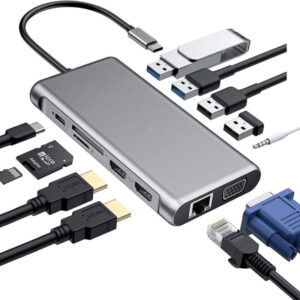
Type-C to HDMI Multi-Function 12-in-1 Hub
Specifications
- Interface Type:USB Type-C
- Ports:12
- Function :HDMI-compatible/Card Reader/RJ45
- Standard: USB 3.0
- Length:15cm
- USB 2.0:480Mbps
- Type C PD port: supports PD charging 87W
- VGA: supports 1080P Video output
- RJ45: supports 10M/100M/1000M Gigabit Ethernet
- SD/TF: does not support simultaneous reading of TF card and SD card, USB 3.0, HDMI, SD/TF card reader, USB HUB, PD charger
SKU: n/a -
Accessories, Keyboard and Mouse Combo, Logitech Accessories
Logitech MK345 Wireless Keyboard and Mouse Combo
-13%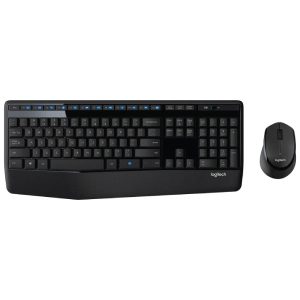 Accessories, Keyboard and Mouse Combo, Logitech Accessories
Logitech MK345 Wireless Keyboard and Mouse Combo
Specifications
- Spill-Resistant Design: The keyboard is designed to withstand accidental spills, which helps protect it from damage caused by liquids.
- Low-Profile Keys: The low-profile keys offer a comfortable typing experience and quiet operation.
- Media Hotkeys: The keyboard includes convenient hotkeys for controlling media playback, volume adjustment, and accessing frequently used functions.
- Battery Life: The keyboard boasts a long battery life, reducing the need for frequent battery changes.
- Full-size keyboard layout: Comfortable, quiet typing on a familiar keyboard layout with generous palm rest, spill-resistant design and easy-access media keys like mute, volume and play
- Comfortable right-handed mouse: Hand-friendly contoured shape for smooth, precise tracking.
- Advanced 2.4 GHz wireless connection: Delivers the reliability and speed of a corded connection.
- Compatibility: Works with PCs using Windows or Chrome operating systems.
- Resolution: 1000 dpi
SKU: n/a -
Accessories, Headsets
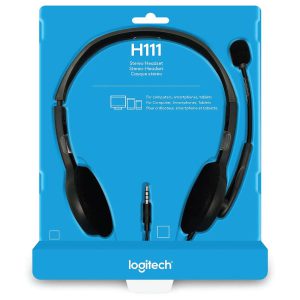
Logitech H111 Stereo Headset – Black (3.5mm Jack)
Specifications
- Connection Type: Wired (3.5 mm audio jack)
- Driver Size: 30 mm
- Frequency Response: 20 Hz – 20 kHz
- Microphone:
- Type: Noise-canceling
- Frequency Response: 100 Hz – 20 kHz
- Adjustable boom microphone
- Controls: In-line volume control and microphone mute switch
- Design:
- On-ear style with soft ear cushions
- Adjustable headband for a personalized fit
- Weight: 120 grams (0.26 lbs)
- Compatibility:
- Compatible with PC, Mac, tablets, and smartphones
- Works with most operating systems, including Windows, macOS, and Chrome OS
- Cable Length: 2 meters (6.5 feet)
SKU: n/a -
Accessories, Logitech Accessories, Mouse
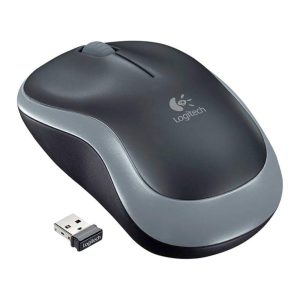
Logitech M185 Wireless Mouse – Swift Grey
Specifications
- Scroll Wheel: Yes, 2D, optical
- Connection Type: 2.4 GHz
- Number of Buttons: 3
- Wireless range: 10 m (33ft)
- Connect / Power: Yes, on/off switch
- Battery: 12 months
- Battery Details: 1 x AA (included)
SKU: n/a -
Accessories, Ugreen Accessories, USB Accessories
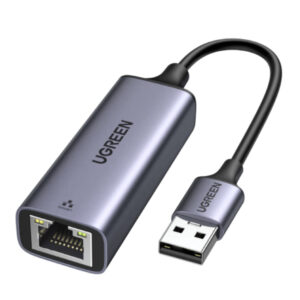
Usb 3.0 To Rj45 Gigabit Ethernet Adapter
specifications
- Connector: USB 3.0 Type-A male to RJ45 female
- Chipset: RTL8153
- Network Speed: 10/100/1000Mbps (Gigabit)
- Material: Aluminum case with space gray finish
- Cable Length: 3.3ft (1m)
- System Compatibility: Windows 10/8.1/8/7/Vista/XP, macOS, Linux, and Chrome OS
- Power Consumption: 3.3V/150mA
- Dimensions: 2.36 x 0.91 x 0.59 inches (60 x 23 x 15mm)
- Weight: 1.23 ounces (35g)
SKU: n/a
There are no reviews yet.